Who's Afraid of Proxmox! Backing up a Windows file server to PBS
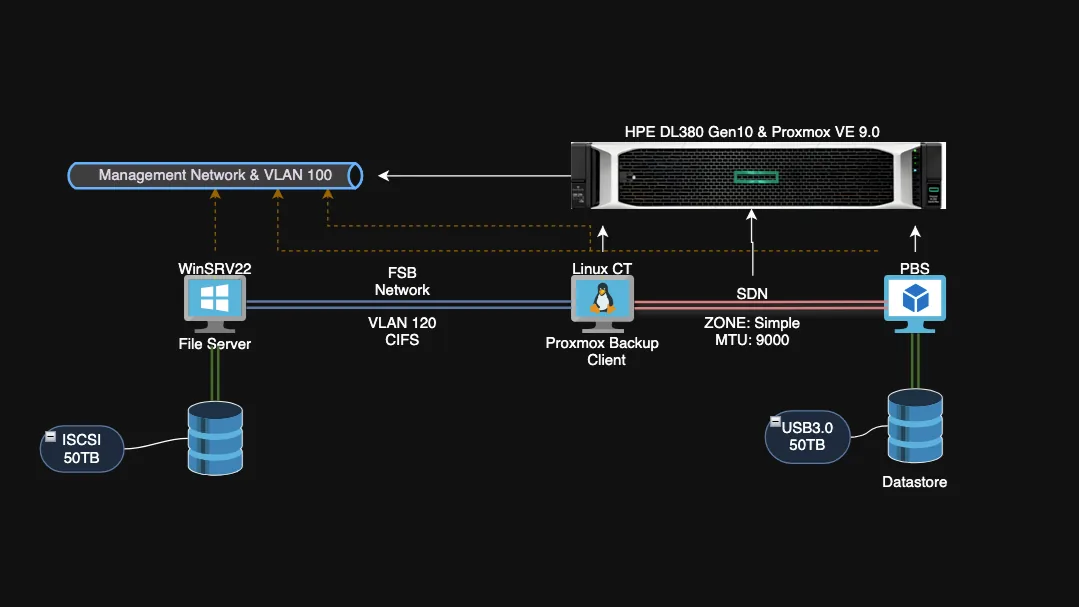
I back up a Windows Server 2022 file server to Proxmox Backup Server (PBS) using the Proxmox Backup Client inside a Debian 13 Linux container. The share is mounted over CIFS and the container reaches PBS over a software-defined network (SDN).
What the article covers
- Adding the Proxmox repository for Debian 13, importing its signing key and installing proxmox-backup-client
- Using an API token instead of a local user (Datastore.Backup, Datastore.Read, Datastore.AllocateSpace)
- Testing a manual backup with PBS_REPOSITORY and PBS_PASSWORD
- A Bash script that uses flock to prevent overlapping runs and writes a log
- Running the script nightly from cron and restricting its permissions
- One PBS namespace per subfolder so retention can differ per folder (for example 30 backups for one, 7 for another)